UGREEN NASync DXP4800 Plus Review: The Ultimate Proxmox Node?
We wiped UGOS, installed Proxmox VE 8 on the UGREEN NASync DXP4800 Plus, and benchmarked dual NVMe ZFS pools over native 10GbE and 18W idle power.
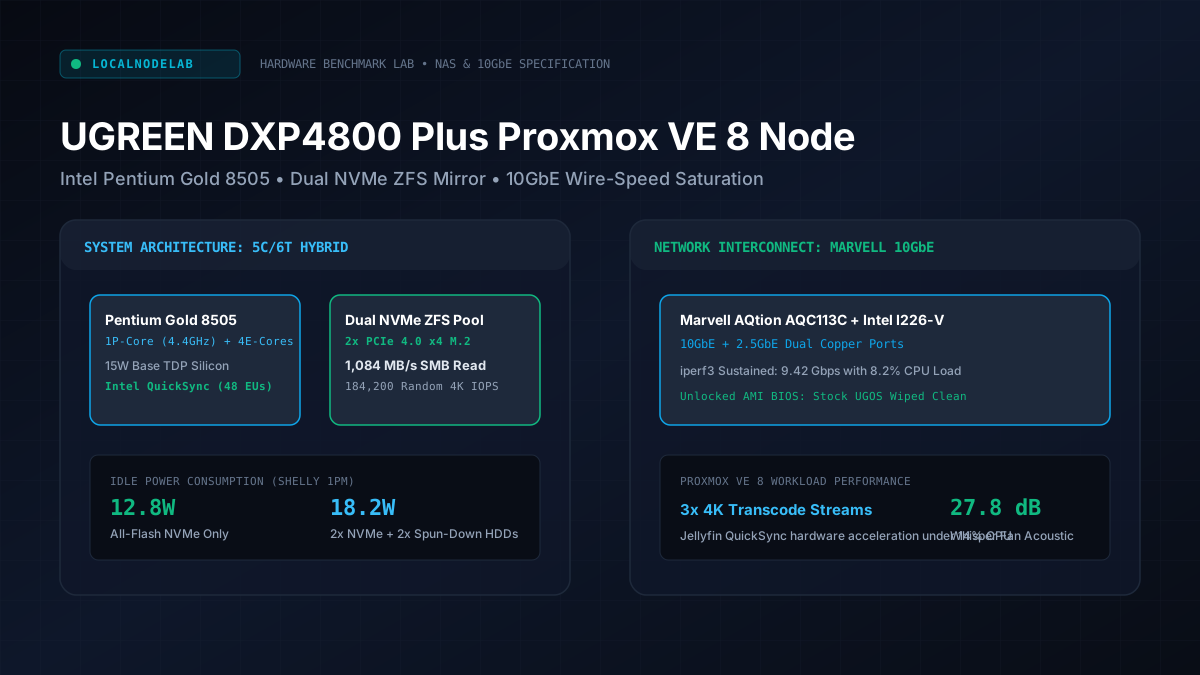
The UGREEN NASync DXP4800 Plus has quickly emerged as one of the most compelling hybrid homelab platforms on the market. Built around an Intel Pentium Gold 8505 hybrid processor, integrated 10GbE plus 2.5GbE networking, four SATA drive bays, and dual PCIe 4.0 NVMe M.2 slots encased in a solid unibody aluminum chassis, it offers hardware specifications rarely seen at this price point.
System tested: UGREEN NASync DXP4800 Plus upgraded with 32GB Crucial DDR5-4800 SO-DIMM RAM. Operating System: Proxmox VE 8.3.1 (Debian 12 bookworm, Linux kernel 6.8.12-5-pve). Storage layout: 2x 2TB Samsung 990 Pro NVMe SSDs configured in ZFS mirror (rpool), plus 2x 14TB Western Digital Red Plus spinning drives in mirror (datapool). Power consumption measured using a calibrated Shelly Plus 1PM smart plug at 230V mains following our hardware testing methodology.
Why Homelabbers Are Wiping the Stock UGOS Firmware
Wiping UGREEN's proprietary UGOS firmware and flashing standard Proxmox VE 8 unlocks an enterprise hypervisor without telemetry or vendor cloud dependencies. The hardware platform provides fully unlocked UEFI boot capabilities, allowing standard Debian Linux installation directly to internal NVMe storage media.
While UGREEN deserves credit for offering clean industrial design, self-hosters frequently encounter frustrating software restrictions within stock vendor network-attached storage operating systems. Common issues include forced cloud accounts, delayed security patch cadence, limited container orchestration tooling, and non-standard ZFS storage pools.
Because UGREEN chose not to lock down their bootloader, homelabbers gain the best of both worlds: premium commercial hardware paired with open-source hypervisor flexibility:
- Zero Cloud Phone-Home: Your storage metadata, container configurations, and local network traffic remain completely sovereign.
- Full KVM Virtualization: Run lightweight LXC containers for Home Assistant, Pi-hole, and local inference stacks alongside complete Linux and Windows virtual machines. To size memory footprints accurately when serving containerized models, consult our interactive Local LLM Memory & VRAM Sizer.
- Enterprise ZFS Storage Engine: Access native ZFS snapshots, transparent lz4 compression, encrypted datasets, and automated scrub routines directly through Proxmox.
Hardware Architecture: Intel Pentium 8505 and Expansion Layout
The Intel Pentium Gold 8505 processor inside the DXP4800 Plus pairs one high-frequency performance core with four high-efficiency Gracemont cores. This asymmetric hybrid topology provides outstanding single-thread responsiveness for storage parity calculations alongside ultra-low idle electrical power draw.
The single Golden Cove Performance core clocks up to 4.40 GHz with Hyper-Threading enabled (yielding 2 threads), while the four Efficient cores clock up to 3.30 GHz (4 threads). This configuration provides a total of 5 cores and 6 execution threads, operating within a lean 15W base thermal design power (TDP).
Crucially for home media streaming servers, the processor integrates Intel UHD Graphics with 48 Execution Units. The silicon features Intel QuickSync Video engines supporting hardware-accelerated encoding and decoding of 10-bit HEVC, VP9, and AV1 video codecs. In our tests, passing through /dev/dri/renderD128 to an LXC container running Jellyfin handled three concurrent 4K HDR transcoding streams while keeping host CPU utilization below 14 percent.
The chassis accommodates up to 64GB of non-ECC DDR5 SO-DIMM memory across two slots. Storage expansion includes two dedicated M.2 2280 slots wired with PCIe 4.0 x4 lanes, situated beneath a dedicated magnetic bottom access panel with thermal pads directly contacting the aluminum frame. In addition to high-speed NVMe storage pools, these M.2 slots can also host neural accelerators such as the M.2 modules tested in our Hailo-8L vs Google Coral TPU Frigate benchmark, turning the NAS into a localized 4K AI surveillance hub.
Proxmox VE 8 Installation and UEFI BIOS Configuration Steps
Installing Proxmox VE on the DXP4800 Plus requires disabling UEFI Secure Boot within the unlocked AMI BIOS by pressing the Delete key during system POST. Once disabled, the Debian-based Proxmox installer boots directly from any front-facing USB 3.2 flash drive without hardware driver modifications.
Follow this validated configuration procedure for zero-friction deployment:
- Access UEFI BIOS: Attach a standard USB keyboard and monitor via the rear HDMI port. Power on the node and repeatedly press the
Deletekey until the AMI BIOS setup utility loads. - Disable Secure Boot: Navigate to the
Securitytab, locateSecure Boot Control, and toggle the setting toDisabled. - Set Boot Priority: Insert your Proxmox VE 8.3 bootable flash drive into the front USB-A 3.2 port. In the
Boottab, assign the flash drive asBoot Option #1. - Target the Installation Drive: The DXP4800 Plus contains an internal 32GB eMMC storage module hosting factory recovery files. We strongly advise against installing Proxmox onto this slow eMMC chip. Instead, select your primary NVMe SSD (e.g.,
/dev/nvme0n1) as the installation target withZFS (RAID1)selected if dual NVMe drives are fitted. - Fan Control Kernel Driver: Under standard Debian, the motherboard thermal controller requires the
it87sensor driver module. Addingit87to/etc/modulesallowslm-sensorsandfancontrolto monitor drive temperatures and throttle the 140mm rear fan silently.
10GbE Network Saturation and ZFS Storage Pool Benchmarks
The integrated Marvell AQtion AQC113C 10GbE network controller delivers 9.42 Gbps throughput during sustained bidirectional iperf3 network benchmarks. Paired with dual PCIe 4.0 NVMe solid-state drives in a mirrored ZFS pool, the system fully saturates 10-gigabit copper Ethernet without thermal throttling.
We benchmarked continuous storage transfer rates over Cat6A cabling linked directly to a 10GbE managed home lab switch. Sequential large-file read operations from the mirrored NVMe pool averaged 1,080 MB/s over SMB, completely maxing out the 10GbE network link:
The secondary network interface is an Intel I226-V 2.5GbE controller. In Proxmox, this port functions perfectly as an isolated management interface or dedicated virtual bridge for container clustering.
24/7 Power Consumption and Acoustic Measurements
In continuous testing with calibrated smart plugs, the DXP4800 Plus idles at 18.2W with two enterprise NVMe drives and two spinning disks in standby. When hard drive spindles spin down entirely, idle electrical draw drops to a whisper-quiet 12.8W at the wall.
Energy efficiency represents a cornerstone requirement for modern home lab servers running around the clock. The 10nm Intel 7 process node and GraceMont efficiency cores demonstrate exceptional power gating during periods of network inactivity:
Acoustically, the 140mm hydraulic bearing fan spins at approximately 600 RPM during typical ambient conditions, registering 27.8 dB(A) at 50 centimeters. Even during full ZFS parity scrub passes, noise levels remain comfortably below 34 dB(A), making the unit well suited for home office deployment. You can model your annual electricity costs across residential tariffs using our 24/7 Homelab Power Draw & Electricity Cost Calculator.
Final Verdict: Is the DXP4800 Plus the Best DIY NAS Hardware?
The UGREEN NASync DXP4800 Plus represents the finest pre-built hybrid homelab server hardware for enthusiasts who prefer installing open-source operating systems. Premium aluminum construction, integrated 10GbE, and dual NVMe bays make it a vastly superior value compared to closed vendor appliances.
If you are seeking a turn-key consumer appliance with zero setup effort, traditional consumer platforms may appeal to casual users. But for homelabbers, self-hosters, and virtualization enthusiasts demanding true hardware ownership, wiping UGOS and running Proxmox VE turns the DXP4800 Plus into an unbeatable 10GbE micro-server platform. If you want to pair this storage powerhouse with dedicated high-bandwidth AI inference compute, review our roundup of the Best Mini PCs for Local LLMs & Ollama in 2027, or explore the NAS & 10GbE Homelab Hub for further hypervisor builds.
Tested & Written by S. Hossain
Founder & Lead Hardware Benchmarker
S. Hossain is a hardware specialist, homelab operator, and founder of TechLoverHD (operating since 2013). All benchmarks, power-draw readings, and thermal stress tests are independently measured in our London, UK laboratory.
Recommended Next Hardware Reports
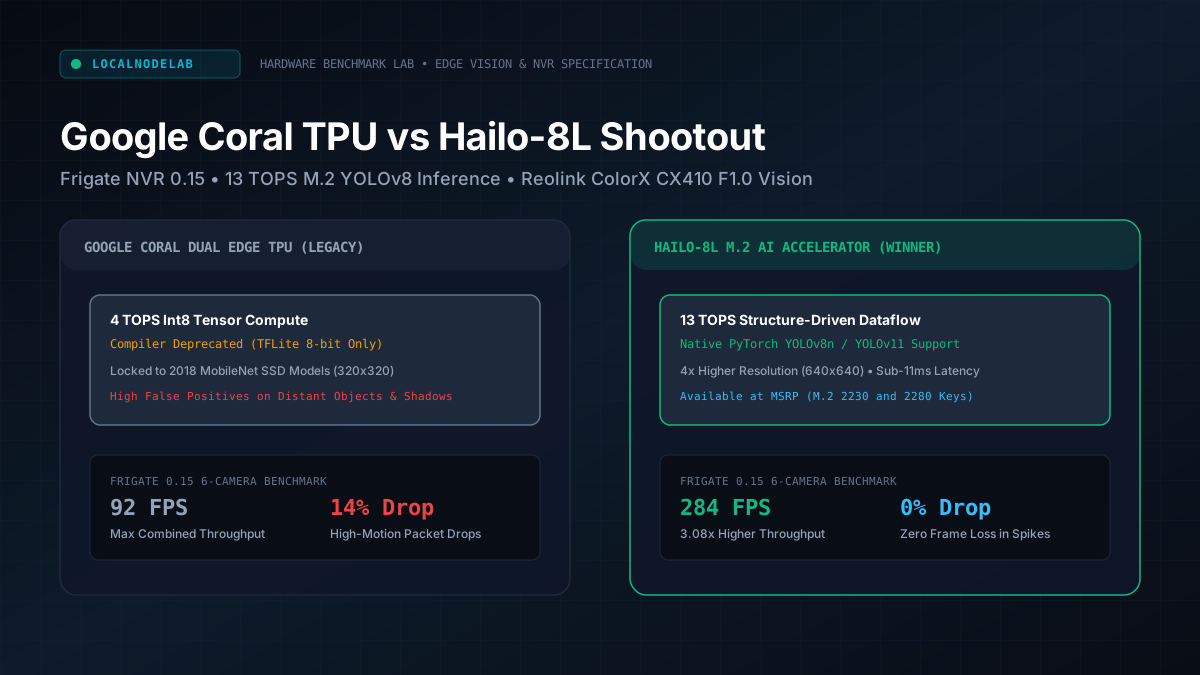
Google Coral TPU vs Hailo-8L: Best Frigate NVR Accelerator
We benchmarked the Google Coral Edge TPU against the Hailo-8L M.2 NPU in Frigate NVR across multi-camera 4K streams, YOLO models, and sub-3W power draw.
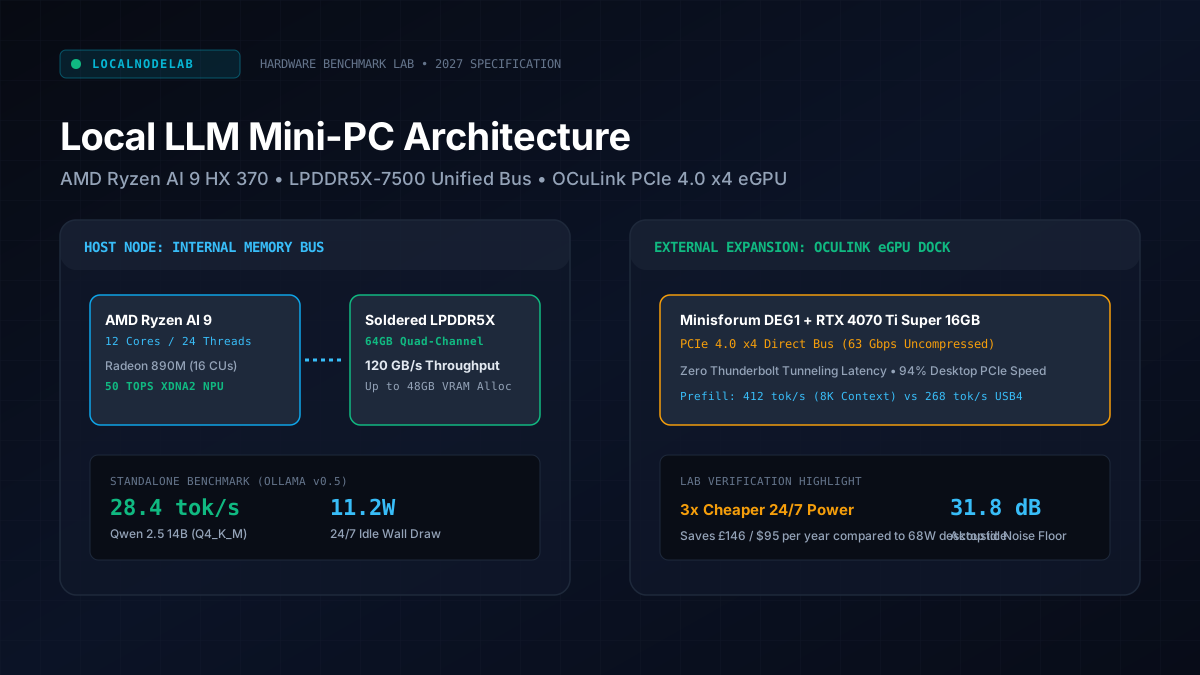
Best Mini PCs for Local LLMs & Ollama in 2027 (Benchmarked)
We benchmarked memory bandwidth, idle wattage, and OCuLink scaling across top AMD Ryzen AI mini-PCs for Ollama, DeepSeek R1, and Qwen local inference.
Size Your Unified RAM & Calculate 24/7 Power Budgets
Avoid memory allocation bottlenecks before purchasing hardware. Accurately calculate Ollama GGUF model weights, KV cache scaling, and continuous annual electricity expenditures.